
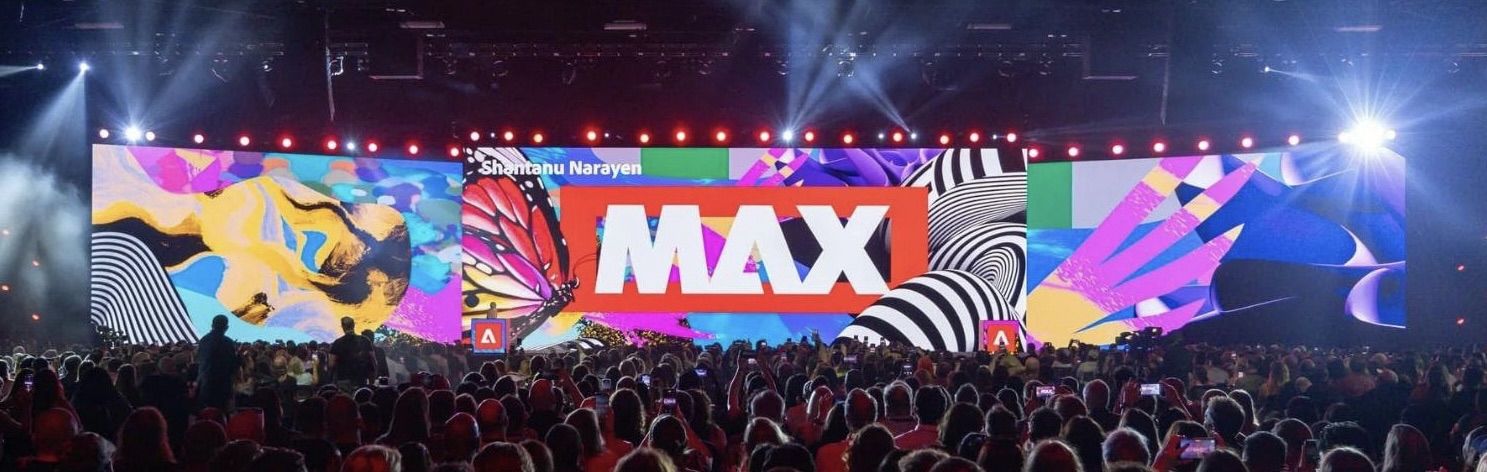
Adobe Max 2024 was held in Miami, Florida on October 14-16 and online. No, I didn’t fly to Miami, I caught everything online and streamed everything.

The event kicked off with exciting announcements, unveiling product updates to enhance digital creativity, and particularly through a new wave of Adobe AI Tools. Now, I’m not a big fan of AI way too much.
Here’s a closer look at some of the key highlights and what they mean for creators.
Keynote Highlights
The keynotes at Adobe Max 2024 were nothing short of spectacular, setting the tone for the entire conference with a series of groundbreaking announcements and visionary insights.
One of the standout moments was the (re)introduction of Firefly, Adobe’s cutting-edge artificial intelligence (AI) technology. Firefly is poised to revolutionize the Creative Cloud suite, offering features like Generative Fill in Photoshop, which has already been a game-changer for Adobe users during its open beta phase.
Generative Fill and Generative Expand are now powered by the latest Adobe Firefly Image Model, so you can get realistic, lifelike results with more control than ever before and new levels of detail, lighting, composition and color for your generated imagery. Plus, with the new Generate Similar feature, you can get more variations of generated images to find the perfect fit.
Photoshop Gets Even More Powerful
Adobe Photoshop takes center stage with the Generative Workspace that lets you explore more ideas in less time with generative AI right within Adobe Photoshop (Beta). Also, Adobe Photoshop best version yet introduces a revamped Distraction Removal tool, which allows users to automatically remove unneeded elements from photos with a single click.
Additionally, the new ‘Text to Vector Graphics’ feature in Photoshop uses AI to create editable, vector-based images directly from user text prompts, streamlining the creative process for designers. For me, it is not yet my favorite feature as a designer yet.
Adobe Premiere Integrates AI
For video editors, Adobe Premiere Pro saw a game-changing introduction with Generative Extend, an AI-powered tool that adds frames to the beginning or end of a video clip to enhance transitions or match cuts. This feature, demonstrated live at the event, is especially useful for editors needing to adjust timing without compromising the original footage, saving hours of meticulous work in post-production. This does make a lot of sense.
Enhancements on Adobe Illustrator
For Adobe Illustrator, we’re enhancing core vector design workflows to give you more speed and power. The new Objects on Path enables you to quickly attach, arrange, and move objects along any type of path in your designs. Enhanced Image Trace lets you convert hand-drawn images and raster graphics into editable vectors with more accurate image tracing and easier editability with fewer anchor points. This is my personal favorite feature for Adobe Illustrator.
Now, the Mockup feature is now generally available, so you can create mockups for brand and apparel designs by placing your artwork on images of real-life objects. Illustrator will automatically adjust your artwork to fit the curves and edges of the object.
Innovations in Adobe Express
Adobe Express has been my favorite program to use for easy content creation.
- They’re introducing several new capabilities in Adobe Express for all kinds of creative work.
- Campaign Creation: Adobe Express helps you produce all the content you need from a single design in just a few clicks.
- Rewrite: Rewrite helps you rephrase, shorten, or change the tone of copy in your designs.
- Animation: Now, you can animate multiple elements in a design, including text, images, shapes and more instantly, with AI to automatically orchestrate the details.
- Import from other apps: Bring in your files from other Adobe apps, like Adobe Photoshop, Illustrator, and now, InDesign. Plus, now you can browse and add photos to your designs directly from Lightroom.
- 1-Click Brand setup: Instantly recolor any photo or illustration to align with your brand with a single click or create brand templates with locked elements to ensure teams stay on-brand. And ensure all of your team’s content comes together and on-brand with the shared calendar in Adobe Express.
Using Adobe Firefly in Premiere Pro and Adobe Express

One of the key things was the closing of day 2 with an exciting look into Adobe Firefly’s integration with Premiere Pro and Adobe Express. This was presented by Cyn Lagos.
She demonstrated the use of AI-powered workflows that was actually impressive, showcasing how these updates can make video editing and motion design more quicker without compromising quality. Nevertheless, it even makes the whole process better and allows for more imagination.
Overall, Adobe Max 2024 was a spectacular event even while streaming from home. It not only brought creatives together but also empowered artists of all skill levels in various spaces. From conversations on branding and storytelling to technical tutorials and addressing client pain points, there was a lot to take in during the 3-day event honestly.


Leave a Reply