
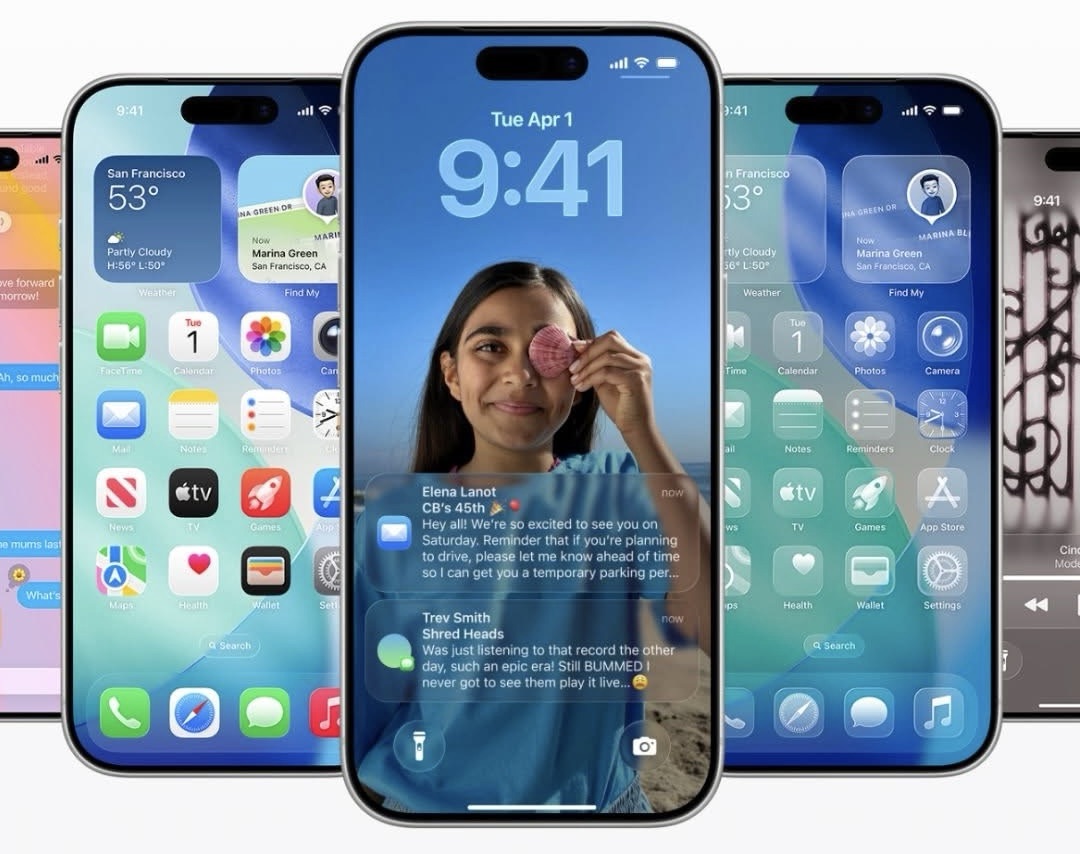
Apple just dropped iOS 26, and it’s honestly one of the biggest iPhone updates we’ve seen in years. It’s a fresh design with new features that is meant to make your iphone smarter. This update is definitely worth paying attention to. Whether you’re wondering about the new look, how it impacts your battery, or if you should hit that “update” button right now — I’ve got you covered.

The New iPhone Design
The biggest visual change is the new Liquid Glass aesthetic. Think: icons and widgets that feel like they’re floating, translucent backgrounds, and even animated wallpapers that actually move with your phone’s light and motion. It’s not just pretty — it makes the iPhone feel alive and way more personalized.
You can even customize app icons with tinted or simplified versions to match your vibe. Apple clearly wants your iPhone to feel less like their device and more like yours.
The Best New Features in iOS 26

Here’s a quick rundown of what Apple packed into the new iOS 26:
- Liquid Glass design – a whole new look with translucent menus, glowing effects, and sleek animations that feel super futuristic.
- Smarter Messages – group chat polls, new conversation backgrounds, and better spam filtering (finally).
- Phone app upgrades – Call Screening makes unknown callers state their reason before you even pick up, plus Hold Assist waits on hold for you.
- Adaptive Power Mode – intelligently dials down performance and brightness to stretch your battery when you need it most.
- Preview on iPhone – edit PDFs, mark up images, and scan docs without needing a third-party app.
- CarPlay redesign – cleaner look, compact call notifications, and quick message reactions.
- Apple Intelligence – AI-powered tools like live translation, Genmoji, and image creation built right into the OS.
Basically, iOS 26 isn’t just a small refresh — it’s packed with quality-of-life upgrades. The upgrade is compatible with my iPhone 14 Plus.
How to Update to iOS 26
Ready to try it out? Updating is simple:
- Back up your iPhone (iCloud or computer).
- Plug into Wi-Fi and power.
- Go to Settings → General → Software Update.
- Tap Download and Install.
- Let it finish, then give your phone a day or so to settle in.
Pro tip: update your apps before installing iOS 26 so everything runs smoothly.
Pros and Cons of iOS 26
Pros
- Gorgeous new Liquid Glass design
- Smarter Messages and Phone features
- Better battery management tools
- Preview app finally on iPhone
- More personalization and AI features (which I don’t care too much for)
Cons
- Heavy graphics may not be everyone’s style
- Some features only work on the latest iPhones
- Temporary battery drain right after installing
- Slight learning curve adjusting to the new look
Battery Life: The Real Impact
- Let’s be real — every big iOS update makes people worry about battery drain. Here’s the deal with iOS 26:
- Right after updating, your iPhone will feel a little sluggish and drain faster. That’s just background processes re-indexing everything. Give it a day or two.
- Adaptive Power Mode is a game-changer if you’re always on the go. It adjusts performance automatically and flips on Low Power Mode at 20% so you’re never caught with a dead phone.
- All the new animations and effects do use a little extra power, but Apple’s optimizations balance it out. On newer iPhones, battery life may actually improve. Another thing is that, I haven’t noticed much of a difference with my iPhone as far as battery.
Bottom line: after the first couple days, battery life should be the same or even better — especially if you use Adaptive Power Mode.
Final Thoughts
iOS 26 is more than just another update — it’s a full refresh that makes your iPhone feel brand new. The Liquid Glass design is beautiful, the new tools are actually useful, and the battery optimizations help balance out the flashy visuals.
If you want your iPhone to feel more modern, smarter, and just more fun to use, iOS 26 is absolutely worth installing.
Leave a Reply